> For the complete documentation index, see [llms.txt](https://chartschool.stockcharts.com/llms.txt). Markdown versions of documentation pages are available by appending `.md` to page URLs; this page is available as [Markdown](https://chartschool.stockcharts.com/table-of-contents/index-and-market-indicator-catalog/cme-futures-and-spot-prices.md).
# CME Futures and Spot Prices
## Overview
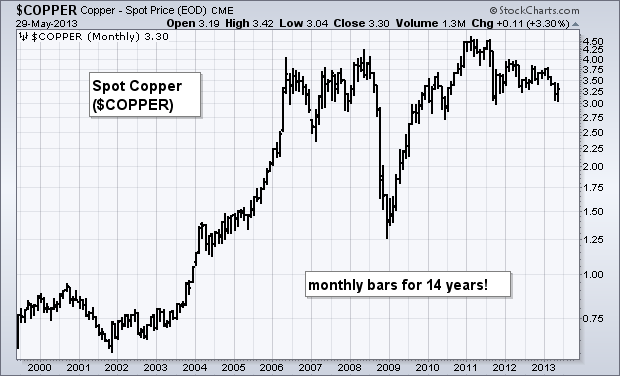
StockCharts.com provides end-of-day (EOD) data for select futures traded through the CME Group. The CME, Cboe, COMEX, KBCT, and NYMEX are now part of the CME Group. These include futures contracts for the e-mini and spot prices for precious metals, oil, and more. Users will see the word “spot” in the name for these symbols. Spot prices allow users to create long-term charts for a specific commodity.
## Details
**Symbol Group:** CME
**Publisher:** CME Group
**Update Frequency:** End-of-day (EOD)
**Online Source:** [CME Group](https://www.cmegroup.com/)
**Links to Current Symbols:** [CME Futures & CME](https://stockcharts.com/search/?q=%22CME%20Futures%22%7C%5E%20CME\§ion=symbols)
## Characteristics
Keep in mind that some futures contracts trade almost round the clock. For example, the E-mini S\&P 500 contract trades 23 hours a day and five days a week (Monday through Friday). This makes the “opening” price almost irrelevant because there is no “overnight” period.
The symbols for these e-mini futures contracts consist of several parts. The first character is a caret (^), which is reserved for futures contracts. The next character or characters represent the name of the futures contract. For example, the “ES” in the symbol **^ESM13** stands for e-mini.
The next three characters represent the month and the year of the contract. The last two numbers identify the year, while the letter identifies the month. **^ESH14** is the symbol for the March 2014 E-Mini contract. Below is a list of the corresponding months and letters.
* F January
* G February
* H March
* J April
* K May
* M June
* N July
* Q August
* U September
* V October
* X November
* Z December
## Chart Example
## Symbol List
StockCharts.com users can access [an up-to-date list of symbols](https://stockcharts.com/find/?q=cme+spot\&searchMode=symbolCatalog) for all our CME Futures and Spot Prices. From this list, click the “Mentions” icon to the right of a specific symbol for more details about the symbol, as well as recent mentions in Public ChartLists, blog articles, and more.
---
# Agent Instructions
This documentation is published with GitBook. GitBook is the documentation platform designed so that both humans and AI agents can read, navigate, and reason over technical content effectively. Learn more at gitbook.com.
## Querying This Documentation
If you need additional information that is not directly available in this page, you can query the documentation by asking a question.
Perform an HTTP GET request on the following URL with the `ask` and `goal` query parameters:
```
GET https://chartschool.stockcharts.com/table-of-contents/index-and-market-indicator-catalog/cme-futures-and-spot-prices.md?ask=&goal=
```
`ask` is the immediate question: it should be specific, self-contained, and written in natural language.
`goal` is what the user is ultimately trying to achieve, the reason they need the answer. Sharing it helps GitBook give you a better, more relevant answer. A goal is most helpful when it describes the outcome the user wants rather than restating the question. For example, with `ask=how do I create an API token`, a goal like `automate deployments from our CI pipeline` lets GitBook tailor the answer to that use case.
The response will contain a direct answer to the question and relevant excerpts and sources from the documentation.
Use this mechanism when the answer is not explicitly present in the current page, you need clarification or additional context, or you want to retrieve related documentation sections.