> For the complete documentation index, see [llms.txt](https://chartschool.stockcharts.com/llms.txt). Markdown versions of documentation pages are available by appending `.md` to page URLs; this page is available as [Markdown](https://chartschool.stockcharts.com/table-of-contents/technical-indicators-and-overlays/technical-indicators/slope.md).

# Slope

## What Is the Slope Indicator? <a href="#introduction" id="introduction"></a>

The slope indicator measures the rise-over-run of a linear regression, which is the line of best fit for a price series. Fluctuating above and below zero, the Slope indicator best resembles a [momentum oscillator](/table-of-contents/technical-indicators-and-overlays/introduction-to-technical-indicators-and-oscillators.md#momentum_oscillators) without boundaries.&#x20;

<figure><img src="https://436553459-files.gitbook.io/~/files/v0/b/gitbook-x-prod.appspot.com/o/spaces%2FERtrZrZOhufFzk6ZQO4B%2Fuploads%2F8C1oP1HdBZvbjMICfKKP%2Fslopeexample.png?alt=media&amp;token=433a43e7-9bd3-4cfe-a1cf-8c0eb3c64156" alt=""><figcaption></figcaption></figure>

Slope is not well suited for overbought/oversold levels, but can measure the direction and strength of a trend. It can also be used with other indicators to identify potential entry points within an ongoing trend.

## Calculating Slope <a href="#calculation" id="calculation"></a>

Slope is based on a linear regression (line of best fit). Even though the formula for a linear regression is beyond the scope of this article, a linear regression can be shown using the Raff Regression Channel in SharpCharts. This annotation tool features a linear regression in the middle with equidistant outer trend lines.&#x20;

Slope equals the rise-over-run for the linear regression. Rise refers to the price change. Run refers to the timeframe. A 20-day Slope would be the rise-over-run of a 20-day linear regression. If the rise is 4 points and the run is two days, then the slope would be 2 (4/2 = 2). If the rise is -6 points and the run is 2, then the slope would be -3 (-6/2 = -3). In general, an advancing period has a positive slope and a declining period has a negative slope. The steepness depends on the sharpness of the advance or decline.

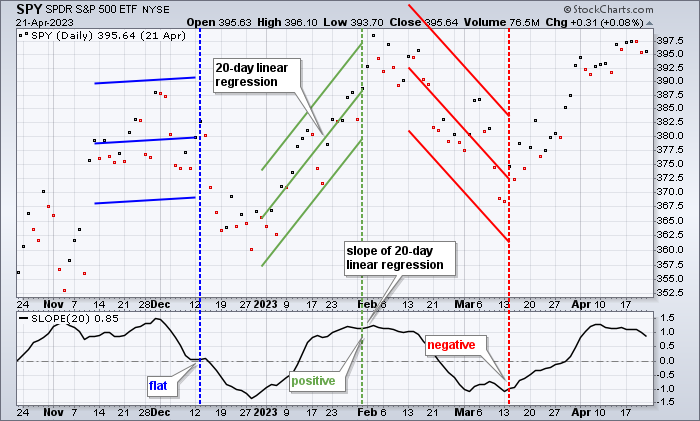
<figure><img src="https://436553459-files.gitbook.io/~/files/v0/b/gitbook-x-prod.appspot.com/o/spaces%2FERtrZrZOhufFzk6ZQO4B%2Fuploads%2FhAnfK81xYenN4hO5mmiu%2Fslop-1-calc.png?alt=media&amp;token=62cd60d2-ccff-458a-aa1d-2bcfcc532c2f" alt=""><figcaption><p>Slope and the Raff Regression Channel both use linear regression</p></figcaption></figure>

The chart above shows the SPDR S\&P 500 ETF (SPY) with three different 20-day periods (blue, green, and red). A 20-day Raff Regression Channel is shown for each 20-day period. The linear regression, in the middle, represents the “line of best fit” for the 20 data points. The dotted lines mark the end of the 20-day period and the value of the slope at that price point. The first period is relatively flat and the slope is barely positive. The second period is up and the slope is clearly positive. The third period is down and the slope is negative. Keep in mind that the Slope changes as old data points are dropped off and new data points are added.

{% hint style="info" %}
**Learn More:** [Raff Regression Channel](/table-of-contents/chart-analysis/chart-annotation-tools/raff-regression-channel.md)
{% endhint %}

## Interpreting Slope <a href="#trend_identification" id="trend_identification"></a>

### Trend Identification <a href="#trend_identification" id="trend_identification"></a>

Slope can be used to [quantify the trend](/table-of-contents/chart-analysis/trend-lines.md). A positive slope is by definition an uptrend. Similarly, a negative slope defines a downtrend.&#x20;

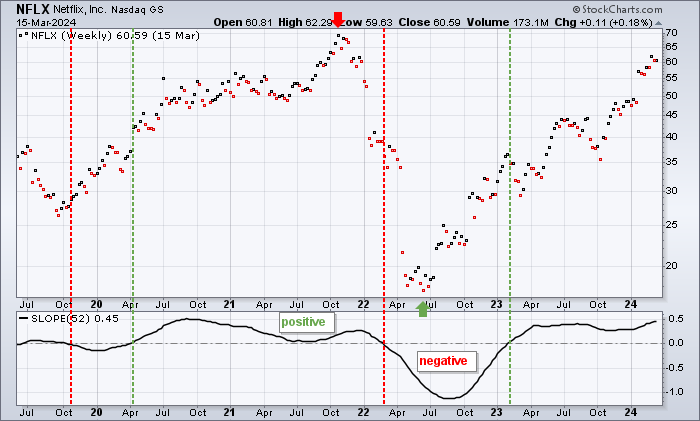
<figure><img src="https://436553459-files.gitbook.io/~/files/v0/b/gitbook-x-prod.appspot.com/o/spaces%2FERtrZrZOhufFzk6ZQO4B%2Fuploads%2F9wFxt6T0ig44Has6Wzvk%2Fslop-2-trend.png?alt=media&amp;token=22226ddc-1f45-4980-8c7c-e068439e2ffa" alt=""><figcaption><p>Slope is positive in an uptrend and negative in a downtrend</p></figcaption></figure>

The chart above shows Netflix (NFLX) with a 52-week Slope (one year). The red dotted lines show the Slope turning negative, while the green dotted lines show the slope turning positive. The 52-week Slope was positive for around two years (2020-2021) and then turned negative in February 2022. Even though Netflix bottomed in June 2022 and moved sharply higher, the 52-week Slope did not cross back into positive territory until February 2023. Notice that the slope does not predict the trend. Instead, it follows the trend or the price points. This means there will be some lag.

### Trend Strength <a href="#trend_strength" id="trend_strength"></a>

Directional movement can also be important when analyzing the slope. A negative and rising slope shows improvement within a downtrend. A positive and falling slope shows deterioration within an uptrend. A moving average added to Slope can also determine trend strength. Slope is rising when above its SMA and falling when below. Moving average crossovers can indicate a coming change in trend.

<figure><img src="https://436553459-files.gitbook.io/~/files/v0/b/gitbook-x-prod.appspot.com/o/spaces%2FERtrZrZOhufFzk6ZQO4B%2Fuploads%2F6r4mF1gK3CBTaijbWfb0%2Fslop-3-trendstrength.png?alt=media&amp;token=24812283-28dc-4cd5-9599-3d92134faaf9" alt=""><figcaption><p>Slope-MA crossovers can foreshadow trend changes</p></figcaption></figure>

The chart above shows the Consumer Discretionary Select Sector SPDR ETF (XLY) with a 100-day Slope indicator. A 20-day simple moving average was added to Slope to identify upturns and downturns. Four key crossovers are identified on this chart (green/red arrows). Notice that the crossovers typically occur before the Slope turns negative or positive. These moving average crossovers are like a leading indicator for Slope. Also, notice the bounce after the negative cross in January 2025. This early slope reversal foreshadowed a move into negative territory, but you should not expect an extended move after every moving average crossover. The 100-day Slope moved below its 20-day SMA in September 2025, yet XLY continued to move higher for several days before settling into a trading range. A declining yet still positive Slope reflects less steepness in the advance. Notice how the 100-day Slope declined but remained positive for the remainder of 2025, even though price had stalled.

### Trade Bias <a href="#trade_bias" id="trade_bias"></a>

Slope alone cannot be used to participate in an ongoing trend, but it can be used alongside other indicators that are better equipped to identify potential entry points. In particular, Slope can be used for trend identification to establish a trading bias. A positive slope dictates a bullish bias, while a negative Slope dictates a bearish bias.&#x20;

Once a trading bias is established, a momentum oscillator can be used to identify potential entry points. The choice of momentum oscillator is really a personal preference. The example below uses the 100-day Slope with 10-day Williams %R, but MACD and PPO are also popular choices.&#x20;

Regardless of which momentum oscillator is used, the look-back period for the Slope should be significantly longer than the look-back period for the momentum oscillator. The Slope defines the bigger trend, while the momentum oscillator represents a subset of that trend.&#x20;

<figure><img src="https://436553459-files.gitbook.io/~/files/v0/b/gitbook-x-prod.appspot.com/o/spaces%2FERtrZrZOhufFzk6ZQO4B%2Fuploads%2FB1ZwIz8WDgORE3pFnUf1%2Fslop-4-tradebias.png?alt=media&amp;token=af683642-dac5-49ad-8ec7-212ef8c7d64b" alt=""><figcaption><p>When Slope is positive, momentum oscillators can help identify entry points</p></figcaption></figure>

The chart above shows Johnson & Johnson (JNJ) with a 100-day Slope indicator and a much shorter 10-day Williams %R indicator. The 100-day Slope moved above zero in July to establish a bullish bias (blue dotted line). With this bullish bias, only bullish signals should be considered for the momentum oscillator. These include oversold readings, centerline crossovers, or signal line crossovers. Williams %R does not have a signal line, but MACD and PPO do. The green dotted lines show each time the 10-day Williams %R moved below -80% to become oversold. Notice that these readings correspond with short pullbacks in the stock. JNJ resumed its uptrend soon after each of these oversold readings.

{% hint style="info" %}
**Learn More:** [Williams %R](/table-of-contents/technical-indicators-and-overlays/technical-indicators/williams-r.md) | [MACD](/table-of-contents/technical-indicators-and-overlays/technical-indicators/macd-moving-average-convergence-divergence-oscillator.md) | [PPO](/table-of-contents/technical-indicators-and-overlays/technical-indicators/percentage-price-oscillator-ppo.md)
{% endhint %}

## Relative Strength <a href="#relative_strength" id="relative_strength"></a>

The Slope of two (or more) securities can be compared to identify relative strength and relative weakness. The direction and relative position of their Slope lines can indicate whether one is outperforming the other.

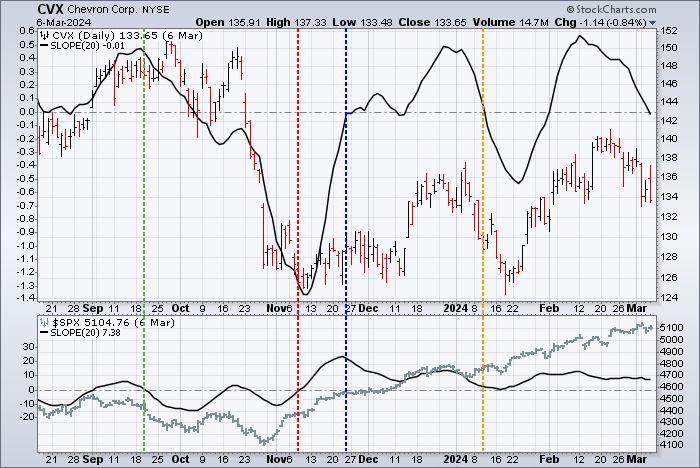
<figure><img src="https://436553459-files.gitbook.io/~/files/v0/b/gitbook-x-prod.appspot.com/o/spaces%2FERtrZrZOhufFzk6ZQO4B%2Fuploads%2FPZr95k6JeFGxWGyKBUvV%2Fslop-5-relstrength.png?alt=media&amp;token=a3f8a1cf-26f3-4b79-93f0-08de522df901" alt=""><figcaption><p>Comparing the slope of two securities to identify relative strength or weakness</p></figcaption></figure>

The chart above shows Chevron (CVX) with the S\&P 500 ($SPX) as Chevron's benchmark. Both securities are shown with the 20-day Slope (black). The green vertical line in mid-September marks a point when the S\&P 500's Slope turned negative, while Chevron's Slope was still well above the zero line. Chevron's Slope plummeted in October and November, and the positions reversed: the S\&P 500's Slope turned positive in mid-November (red vertical line) while Chevron's slope was deeply negative. Two weeks later, Chevron crossed back into positive territory (blue vertical line) while the S\&P 500's Slope turned downward (though still positive). In early January, Chevron's Slope turned sharply downward and entered negative territory (orange vertical line), while the S\&P 500's Slope, though close to the zero line, remained positive and moved upwards in late January.

Based on the Slope comparison, Chevron went from relative strength in September to relative weakness in early November, then back to relative strength again in late November, and finally, returned to relative weakness in early January.

## The Bottom Line <a href="#conclusion" id="conclusion"></a>

Slope measures the rise-over-run of a linear regression. In general, an uptrend is present when Slope is positive and a downtrend exists when the slope is negative. The timeframe depends on the number of days. 10 days covers a short-term trend, 100 days a medium-term trend, and 250 days a long-term trend. As with typical trend-following indicators, Slope lags price and reverses after an actual top or bottom. This does not, however, detract from its usefulness. Trend identification and trend strength are important tools, even for traders. As with moving averages, Slope can be used with momentum indicators to participate in an ongoing trend.

***

## Charting with Slope <a href="#using_with_sharpcharts" id="using_with_sharpcharts"></a>

The Slope indicator can be added to SharpCharts and ACP charts.

### Using with SharpCharts <a href="#using_with_sharpcharts" id="using_with_sharpcharts"></a>

Slope can be found near the bottom of the indicator list on SharpCharts. The default parameter (20) can be changed to suit the desired timeframe. Like all indicators, Slope can be positioned above the price plot, behind the price plot, or below the price plot. In addition, chartists can use the Overlay field to apply a moving average or another indicator to Slope.

[Click here for a live version of this chart.](https://stockcharts.com/sc3/ui/?s=DIA\&a=2359740307\&p=D\&yr=1\&mn=0\&dy=0\&id=p07455967137)

<figure><img src="https://436553459-files.gitbook.io/~/files/v0/b/gitbook-x-prod.appspot.com/o/spaces%2FERtrZrZOhufFzk6ZQO4B%2Fuploads%2FRNDcAKuNDxeoBQXN1m9M%2Fslopeinshch.png?alt=media&amp;token=69a9c9eb-c348-4d4d-8add-3bf1e0ed9b8d" alt=""><figcaption></figcaption></figure>

<figure><img src="https://436553459-files.gitbook.io/~/files/v0/b/gitbook-x-prod.appspot.com/o/spaces%2FERtrZrZOhufFzk6ZQO4B%2Fuploads%2F7S07tEsgSE5j666IrU9C%2Fslop-6-sharpcharts.png?alt=media&amp;token=e0349a3a-def3-486a-b910-0a81eb0f1a30" alt=""><figcaption><p>SharpCharts settings for the Slope indicator</p></figcaption></figure>

{% hint style="info" %}
**Learn More:** For more details on the parameters used to configure Slope indicators, please see our [SharpCharts Parameter Reference](https://help.stockcharts.com/charts-and-tools/sharpcharts/sharpcharts-workbench/editing-sharpcharts/sharpcharts-parameter-reference#slope_linear_regression) in the Support Center.
{% endhint %}

### Using with SharpChartsACP

This indicator can be added from the Chart Settings panel for your StockChartsACP chart. The indicator can be positioned above, below, or behind the security's price plot.

<figure><img src="https://436553459-files.gitbook.io/~/files/v0/b/gitbook-x-prod.appspot.com/o/spaces%2FERtrZrZOhufFzk6ZQO4B%2Fuploads%2F4SdEDONsT003vuwxCodl%2Fslopeinacp.png?alt=media&amp;token=de84a2d3-982d-4eb3-a324-e1cb0678be1c" alt=""><figcaption></figcaption></figure>

[Click here for a live version of this chart.](https://schrts.co/wfHNgBZf)

By default, the indicator uses 20 periods for calculating the linear regression. This parameter can be adjusted to meet your technical analysis needs.

## Scanning for Slope <a href="#suggested_scans" id="suggested_scans"></a>

StockCharts members can search for stocks based on Slope values. Below are some example scans that can be used for Slope-based signals. Simply copy the scan text and paste it into the Scan Criteria box in the [Advanced Scan Workbench](https://stockcharts.com/def/servlet/ScanUI).

Members can also set up alerts to notify them when a Slope-based signal is triggered for a stock. Alerts use the same syntax as scans, so the sample scans below can be used as a starting point for setting up alerts as well. Simply copy the scan text and paste it into the Alert Criteria box in the [Technical Alert Workbench](https://stockcharts.com/h-al/al)

### Oversold in an Uptrend <a href="#oversold_in_an_uptrend" id="oversold_in_an_uptrend"></a>

This scan reveals stocks that are oversold (short-term Williams %R below -80) in a medium-term uptrend (positive 100-day Slope).

```
[type = stock] AND [country = US]
AND [Daily SMA(20,Daily Volume) > 40000]
AND [Daily SMA(60,Daily Close) > 5]

AND [Daily Slope(100,Daily Close) > 0]
AND [Daily Williams %R(10) < -80]
```

### Overbought in a Downtrend <a href="#overbought_in_a_downtrend" id="overbought_in_a_downtrend"></a>

This scan reveals stocks that are overbought (short-term Williams %R above -20) in a medium-term downtrend (negative 100-day Slope).

```
[type = stock] AND [country = US]
AND [Daily SMA(20,Daily Volume) > 40000]
AND [Daily SMA(60,Daily Close) > 5]

AND [Daily Slope(100,Daily Close) < 0]
AND [Daily Williams %R(10) > -20]
```

{% hint style="info" %}
**Learn More.** For more details on the syntax to use for Slope scans, please see our [Scanning Indicator Reference](https://help.stockcharts.com/scanning-and-alerts/scan-writing-resource-center/scan-syntax-reference/scan-syntax-technical-indicators#slope_slope) in the Support Center.
{% endhint %}


---

# Agent Instructions
This documentation is published with GitBook. GitBook is the documentation platform designed so that both humans and AI agents can read, navigate, and reason over technical content effectively. Learn more at gitbook.com.

## Querying This Documentation
If you need additional information that is not directly available in this page, you can query the documentation dynamically by asking a question.

Perform an HTTP GET request on the current page URL with the `ask` query parameter, and the optional `goal` query parameter:

```
GET https://chartschool.stockcharts.com/table-of-contents/technical-indicators-and-overlays/technical-indicators/slope.md?ask=<question>&goal=<endgoal>
```

`ask` is the immediate question: it should be specific, self-contained, and written in natural language.
`goal` is optional and describes the broader end goal you are ultimately trying to accomplish on behalf of the user. GitBook uses it to tailor the answer towards what is most useful for that goal.

The response will contain a direct answer to the question and relevant excerpts and sources from the documentation.

Use this mechanism when the answer is not explicitly present in the current page, you need clarification or additional context, or you want to retrieve related documentation sections.